イベント処理
- ユーザの操作を受けて動く処理をイベント処理と言う
- イベント処理の設定方法を紹介
イベントとは
Windowsフォームアプリは画面を表示して、ユーザが画面を操作することで動作します。
ユーザがどんな操作したかによって動き出すプログラムをイベント処理と言います。
代表的なのは、ボタンのクリックによるイベント処理です。
今回はボタンクリックによるイベント処理を実行するサンプルプログラムをご紹介します。
ボタンを押して画面表示を変えるサンプルプログラム
次のようなサンプルプログラムを紹介します。
①起動すると「Hello World!」を表示
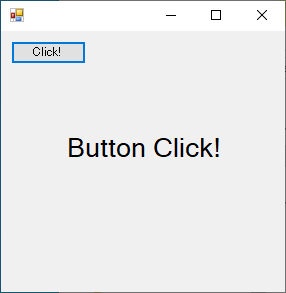
②ボタンをクリックすると表示が「Button Click!」に変る
実行結果サンプル
プログラムを実行すると次の画面を表示します。
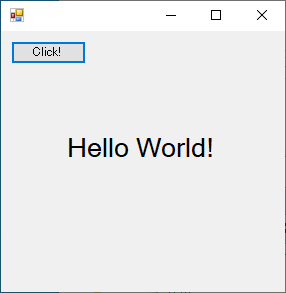
「Click!」のボタンをクリックすると、表示が「Button Click!」に変ります。
プログラム作成
実際にプログラムを用意します。
次のファイルを同じフォルダに作成してください。
using System;
using System.Windows.Forms;

namespace SampleProgram
{
    class Program
    {
        [STAThread]
        static void Main(string[] args)
        {
            Application.EnableVisualStyles();
            Application.SetCompatibleTextRenderingDefault(false);
            Application.Run(new Form1());
        }
    }
}
using System;
using System.Windows.Forms;

namespace SampleProgram
{
    public class Form1 : Form
    {
        private Label label1;
        private Button button1;

        // コンストラクタ
        public Form1()
        {
            // フォームの描画を保留
            this.SuspendLayout();

            // ラベル作成
            this.label1 = new Label();
            this.label1.Text = "Hello World!";
            this.label1.Location = new System.Drawing.Point(60, 100);
            this.label1.Font = new System.Drawing.Font(label1.Font.OriginalFontName, 20f);
            this.label1.AutoSize = true;

            // ボタン作成
            this.button1 = new Button();
            this.button1.Text = "Click!";
            this.button1.Location = new System.Drawing.Point(10, 10);
            this.button1.AutoSize = true;
            // ボタンクリック時のイベント設定
            this.button1.Click += new System.EventHandler(this.button1_Click);

            // コントロールを貼付
            this.Controls.Add(this.label1);
            this.Controls.Add(this.button1);

            // フォームを描画
            this.ResumeLayout(false);
            this.PerformLayout();
        }

        // ボタンクリック時の処理
        private void button1_Click(object sender, EventArgs e)
        {
            this.label1.Text = "Button Click!";
        }

    }
}
C:\Windows\Microsoft.NET\Framework\v4.0.30319\csc.exe ^
  /t:winexe ^
  *.cs
pause
ファイルを作成できたらCompile.batを実行してみましょう。
同じフォルダにProgram.exeが作成されます。
Program.exeを実行して実行結果サンプルのように動いたら成功です。
プログラム解説
作成したプログラムを解説していきます。
イベントの設定方法
使用できるイベントは画面に配置するコントロールごとに決まっています。
ボタンクリック時のイベントはButtonコントールのClickに対して設定します。
ButtonコントールのClickに対し、+=でSystem.EventHandlerをnewしたクラスをセットします。
this.button1.Click += new System.EventHandler(this.button1_Click);
EventHandlerには、(object sender, EventArgs e)を引数にしたメソッドをセットします。
        private void button1_Click(object sender, EventArgs e)
        {
            this.label1.Text = "Button Click!";
        }
これによりボタンをクリックするとbutton1_Clickメソッドの処理が実行されるようになります。
イベントの引数(sender)
コントロールのイベントにより引数は変わりますが、イベント処理の基本の引数が(object sender, EventArgs e)です。
object senderは、イベントが発生したコントロールが渡されます。
senderを使用したbutton1_Clickのサンプルプログラムを下記に紹介します。
イベント発生したコントロールがボタンだった場合、ボタンに表示している文字列をラベルに表示するプログラムです。
        private void button1_Click(object sender, EventArgs e)
        {
            if (sender is Button)
            {
                this.label1.Text = ((Button)sender).Text;
            }
        }
if (sender is Button)でsenderがボタンコンロトールかどうかをチェックしています
((Button)sender)でsenderをButtonに型変換して参照できるようになります。
((Button)sender).Textとすることで、ボタンに表示している文字列が取得できます。
イベントの引数(e)
EventArgs eは各種イベントごとの情報の引き渡し用の引数です。
イベントには色々な種類があります。
イベントによってはEventArgsを継承したクラスを使って必要な情報をやり取りできるようになっています。
ボタンのクリックイベントでは、特別な情報がないためほぼ使用する機会はありません。